
Ergonomic Tips: How to Maintain Good Posture at Work
Your shoulders ache, your neck feels like concrete, and you can’t remember the last time you sat up straight. Sound familiar? We see countless patients at our clinic who’ve fallen victim to poor workplace posture. The good news? Simple ergonomic tips can transform your workday from painful to productive.
Why Ergonomics at Work Matters
Let’s get real about what’s happening to your body during those marathon work sessions. When we slouch, crane our necks forward, or twist awkwardly to reach our mouse, we’re essentially asking our spine to perform gymnastics it wasn’t designed for.
Good posture keeps your ears aligned over your shoulders, shoulders over your hips, and maintains your spine’s natural curves. Bad posture, on the other hand, creates a domino effect of problems throughout your body.
See more: Top Desk Stretches for Office Workers: Relieve Pain, Fix Posture, and Boost Productivity
The Hidden Costs of Poor Office Ergonomics
Research from the American Chiropractic Association shows that 80% of Americans will experience back pain at some point in their lives, with workplace posture being a major contributor. Dr. Stuart McGill’s studies at the University of Waterloo reveal that prolonged sitting increases disc pressure by up to 40%.
Here’s what poor workplace ergonomics typically leads to:
- Neck strain from forward head posture
- Carpal tunnel syndrome from awkward wrist angles
- Spinal misalignment causing chronic back pain
- Tension headaches from tight neck and shoulder muscles
- Chronic fatigue from your body working overtime to maintain poor positions
Early Warning Signs You Need Better Ergonomics
Your body is remarkably good at sending distress signals. Pay attention to these red flags:
- Stiffness when you first stand up
- Frequent headaches, especially late in the day
- Shoulder or neck pain during work
- Tingling in your hands or fingers
- Lower back pain that worsens with sitting
Essential Ergonomic Tips for Your Workspace
Now, let’s dive into the meat and potatoes of creating an ergonomically sound workspace. Think of this as building a foundation for better health, one adjustment at a time.
Choosing the Right Chair
Your chair is your workday partner, so choose wisely. A quality ergonomic chair is like having a personal assistant for your spine.
Key features to look for:
- Lumbar support: This isn’t negotiable. Your lower back’s natural curve needs support, especially if you’re incorporating Chiropractic BioPhysics® principles into your posture correction journey.
- Adjustable seat height: Your feet should rest flat on the floor with thighs parallel to the ground
- Seat depth: You should have 2-3 inches between the back of your knees and the seat edge
- Armrests: These should support your forearms without hunching your shoulders
Budget-friendly add-ons:
- Lumbar pillows for chairs lacking proper support
- Seat cushions to improve height and comfort
- Ergonomic seat covers for better pressure distribution
Desk Setup That Works for You
Your desk height determines whether your arms and shoulders can relax or if they’ll be in constant tension mode.
The golden rule: Your elbows should bend at roughly 90 degrees when typing. If your desk is too high, you’ll hunch your shoulders. Too low, and you’ll slouch forward.
Standing Desks vs. Sitting Desks
We often get asked about standing desks. Here’s the honest truth: both sitting and standing all day can cause problems. The key is movement and variety.
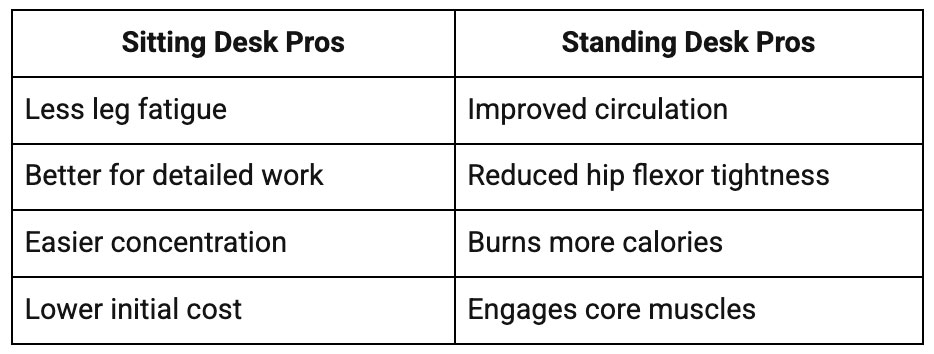
Pro tip: If you choose a standing desk, invest in an anti-fatigue mat. Your feet and back will thank you.
Keyboard and Mouse Positioning
This is where many people unknowingly sabotage their ergonomic posture. Your wrists should remain in a neutral position – not bent up, down, or to either side.
Best practices include:
- Keep your keyboard at elbow height
- Position your mouse close to your keyboard
- Consider ergonomic keyboards with a curved design
- Try vertical mice to reduce forearm rotation
- Use wrist rests, but don’t actually rest your wrists while typing
Monitor & Screen Positioning
Your screen setup can make or break your neck health. We see so many patients whose “tech neck” stems from poorly positioned monitors.
The ideal setup:
- Eye-level alignment: The top of your screen should be at or slightly below eye level
- Arm’s length distance: Sit about 20-26 inches from your screen
- Perpendicular positioning: Your screen should be directly in front of you, not angled
Dual-Monitor Setups
If you use two monitors, position them at equal distances and heights. Your primary monitor should be directly in front of you, with the secondary monitor angled no more than 35 degrees to either side.
Lighting matters too: Position your screen perpendicular to windows to reduce glare. Use adjustable blinds or an anti-glare screen filter if needed.
Laptop Ergonomics
Let’s be honest – laptops are ergonomic nightmares. The screen is too low, the keyboard too high, and everything’s cramped together. But we can work with what we have.
Laptop survival strategies:
- Use a laptop stand to raise the screen to eye level
- Connect an external keyboard and mouse
- Take frequent breaks to stretch and move
- Consider a portable laptop ergonomic setup for travel
Placement of Frequently Used Objects
This might seem obvious, but you’d be surprised how often we twist and reach for things throughout the day. Every awkward reach adds up.
Smart placement rules:
- Keep frequently used items within arm’s reach
- Use a headset instead of cradling your phone between your ear and shoulder
- Position your water bottle and coffee cup where you can grab them easily
- Store reference materials at eye level to avoid neck strain
Beyond the Desk: Movement and Micro-Breaks
Here’s a truth bomb: the best ergonomic tips for office workers include regular movement. No chair or desk setup can compensate for hours of immobility.
Why does movement matter for spinal health? Dr. Joan Vernikos, former director of NASA’s Life Sciences Division, found that breaking up prolonged sitting every 30 minutes significantly reduces health risks. Even simple movements trigger muscle activation and improve circulation.
Quick Desk Stretches and Mobility Exercises
Try these throughout your workday:
Neck stretches:
- Gentle side bends (ear to shoulder)
- Slow neck rotations
- Chin tucks to counter forward head posture
Shoulder and upper back:
- Shoulder blade squeezes
- Doorway chest stretches
- Upper trapezius stretches
Lower back and hips:
- Seated spinal twists
- Hip flexor stretches (step back into a lunge position)
- Cat-cow stretches while seated
The 20-20-20 Rule
Every 20 minutes, look at something 20 feet away for at least 20 seconds. This simple rule helps both your eyes and your posture by encouraging movement and reducing strain.
Enhanced version: Every 20 minutes, stand for 20 seconds and do 20 shoulder rolls. Your spine will love the variety.
Ergonomics Beyond the Office
Ergonomic Tips for Home Office and Remote Workers
Working from home presents unique challenges. Kitchen tables and couches weren’t designed for 8-hour workdays.
Budget-friendly home office solutions:
- Stack books under your laptop to raise the screen
- Use a rolled towel for lumbar support
- Set up in a room with good natural light
- Invest in a proper chair before expensive gadgets
Creating boundaries: Designate a specific work area, even if it’s just a corner of your bedroom. This helps maintain both physical and mental boundaries.
Ergonomics for Mobile Devices
“Text neck” is real, and it’s becoming an epidemic. Dr. Kenneth Hansraj’s research shows that looking down at your phone puts up to 60 pounds of pressure on your cervical spine.
Mobile device best practices:
- Hold devices at eye level when possible
- Use voice-to-text features for longer messages
- Take frequent breaks from scrolling
- Consider a phone stand for extended use
Lifestyle Habits That Support Posture
Your ergonomic posture extends beyond work hours. These habits create a foundation for better spinal health:
- Sleep posture: Your mattress and pillow should maintain spinal alignment. Side sleepers need a pillow between their knees, while back sleepers benefit from a small pillow under their knees.
- Hydration: Dehydrated discs lose height and flexibility. Aim for half your body weight in ounces of water daily.
- Core strengthening: A strong core supports your spine naturally. Simple exercises like planks and bird dogs work wonders.
Next Steps for Better Posture and Spinal Health
Sometimes, despite our best efforts with ergonomic tips, persistent pain signals deeper issues. This is where professional help becomes invaluable.
When to seek professional help:
- Pain that persists despite ergonomic improvements
- Morning stiffness that doesn’t improve
- Headaches that worsen throughout the day
- Numbness or tingling in your hands or arms
How Chiropractic BioPhysics® addresses root causes?
At North Alabama Spine & Rehab, we don’t just treat symptoms – we correct the underlying spinal misalignments that poor posture creates. Chiropractic BioPhysics® uses specific exercises, spinal adjustments, and postural rehabilitation to restore your spine’s natural curves.
This approach goes beyond temporary relief to create lasting change. We’ve seen remarkable transformations when patients combine our treatments with consistent workplace ergonomics.
If you’re experiencing persistent discomfort, don’t wait for it to worsen. As your trusted chiropractor Huntsville AL, we’re here to help you build a pain-free, productive work life.